Product 3: Turn Sync
September 3, 2026 · 3 min read
← Back to the goal: 6 products in 2026
The third product in my goal of building 6 products in 2026 is Turn Sync — a shared game clock for board game night. Think chess clock, but for the whole table: every player uses their own phone, and everyone sees the same countdown at the same time.
Everyone knows who it is
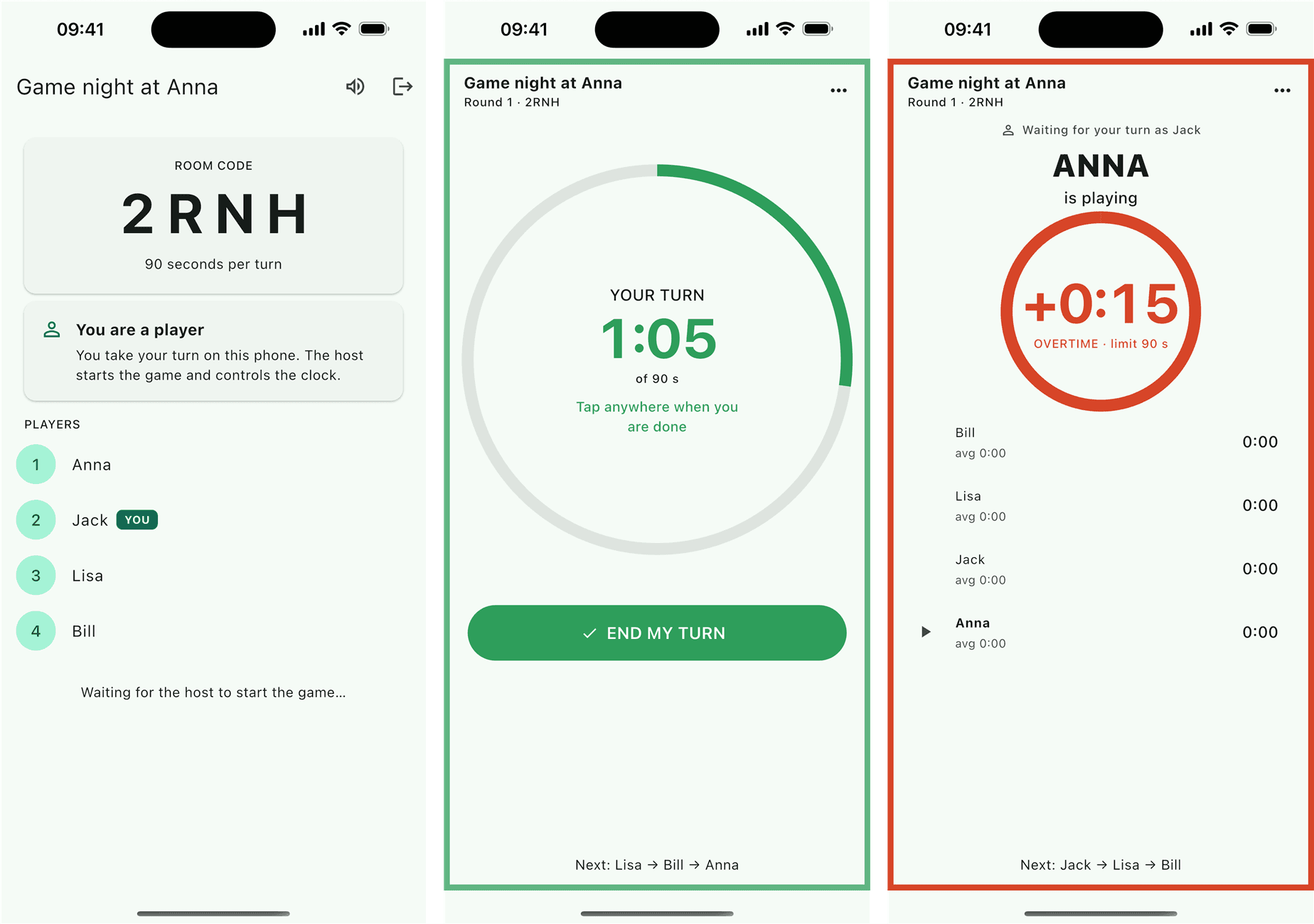
Anyone who plays board games knows the type: the one who just needs to "think for a second" — while the rest of the table fetches coffee, checks their phones and starts discussing something else entirely. Turn Sync is the solution, and a little bit of the revenge. One player creates a room, the rest join with a short room code or by scanning a QR code, and every turn gets a time limit. Go into overtime and the clock turns red while every phone at the table buzzes. No argument — the clock has spoken.
And at the end of the night comes the best part: the statistics. Who used the most time in total? Who had the most overtime turns? "Slowest of the night" is a title that gets handed out with great pleasure.
What it looks like
Features
- Everyone uses their own phone — one player creates the room, the rest join with a room code or QR
- Two game modes: turn by turn in order, or "everyone at once" where each player taps ready and the host starts the next round
- Overtime alert with sound and vibration — on every phone around the table
- Host controls: pause, skip, adjust the time limit mid-game
- Statistics on time used per player — including the slowest and fastest of the night
- No sign-up — no account, no email, just a name
How I built it
The app is built with Flutter, and the realtime part runs on Supabase — the room lives in a Postgres database, and every phone listens for changes via Realtime. When one player taps "done", everyone else sees it immediately.
The most fun technical puzzle was the clock itself. A naive countdown on each phone would drift apart the moment someone locked their screen. Instead, the start time of the turn is stored on the server, and each phone recalculates the remaining time on every tick — adjusted for the difference between the phone's clock and the server's, which the app measures at startup. That way every phone shows the same thing, even after the screen has been off.
The invitations were a little journey of their own: the QR code points to a regular web address, which opens the app directly if it is installed — and sends you to Google Play if not. The room code even rides along through the Play Store, so the app jumps straight into the room after installation.
Download
 |  |